Voice Memo to Text: Convert Speech to Searchable Notes
The fastest way to go from 'I have an idea' to 'I have a written record.' Speak your thoughts into your phone, get a clean transcript in seconds. No typing required.
On This Page
The Untapped Superpower of Your Phone
Your phone has a voice memo app. You've probably used it once or twice — for a reminder, a fleeting idea, or a recording you never listened to again. But here's what most people don't realize: your voice memos are a goldmine of unstructured knowledge — and AI transcription unlocks them.
- 3–4× – Faster to speak an idea than type it — 150 wpm spoken vs. 40 wpm on a phone keyboard
- 90%+ – Of voice memo users never revisit recordings — because audio isn't searchable
- 2.5× – Higher idea recall when spoken aloud vs. typed (cognitive production effect)
- -60% – Less time to create a first draft by speaking vs. typing (writer workflow data)
The problem with voice memos has never been recording them — it's been retrieving them. You can't Ctrl+F an audio file. You can't scan 30 voice memos in 60 seconds looking for that one idea you had three weeks ago. Transcription changes that completely.
The retrieval problem — by the numbers Think about your last 50 voice memos. How many could you find in under two minutes? The average professional loses 25% of their ideas simply because they can't find them again. Searchable transcripts eliminate this entirely. When every word you've spoken becomes Ctrl+F-able, voice memos transform from a graveyard into a knowledge base. Across the industry, 85% of AI transcription users say the ability to search past recordings is the single most valuable feature — more than accuracy, more than speed.
Voice Memo Scenarios: Where Speaking Beats Typing
- 💡 Creative Brain Dumps – When ideas flow faster than fingers. Speak freely for 5 minutes, get a transcript you can organize into a structured outline.
- 🚗 Commute & Drive Time – Capture thoughts during your commute without looking at a screen. Arrive with a transcript of everything you thought about.
- 🌙 Late-Night Ideas – The 3 AM idea that's too brilliant to forget — but you don't want to turn on a bright screen. Whisper it. Transcribe it in the morning.
- 🏃 Walking Meetings – Record solo walking reflections after a big meeting. Turn unstructured stream-of-consciousness into actionable meeting notes.
- 📖 Journaling & Reflection – Speak your daily journal entry instead of writing it. More depth, less friction. Transcript becomes your searchable life log.
- 🧠 ADHD & Neurodivergence – For brains that move faster than hands: speak the thought now, process the transcript later. Zero friction capture.
- ✍️ Writers & Content Creators – Speak your first draft. The transcript becomes raw material — edit it, don't write from scratch. Cuts first-draft time by 60%.
- 👶 Busy Parents – Record thoughts while hands are full. Grocery lists, to-dos, gift ideas. Transcribe later when you have a free hand.
The Voice-to-Text Workflow
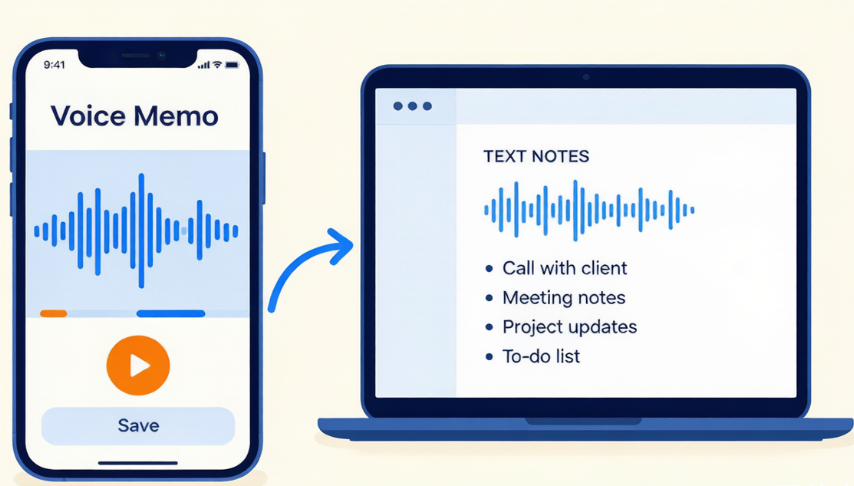
Here's the complete pipeline — from speaking to organized notes:
1. Capture — Speak Freely
Open your phone's voice memo app. Hit record. Talk like you're explaining your idea to a friend. Don't self-edit. Don't worry about structure. The goal is zero-friction capture — get the thought out of your head and into a file. Even if it's messy.
2. Transcribe — AI Converts to Text
Upload the memo to an AI transcription tool. Within seconds, you have a text file with every word you spoke — formatted into sentences and paragraphs, with punctuation. The key metric here: the transcription should take less time than typing would have.
3. Process — Turn Raw Transcript Into Useful Notes
This is where most people stop — and it's why their voice memos stay useless. You need to process the transcript: highlight action items, extract key ideas, delete the rambling. Think of the transcript as raw ore. You still need to refine it.
4. Store — Make It Searchable Forever
Save the processed transcript to your note-taking app (Notion, Obsidian, Evernote, Apple Notes, Google Keep). Add a few tags or a date. Now it's part of your searchable knowledge base — not just another audio file you'll never listen to again.
How to Convert Voice Memos Using AudioTranscription.io
1. Record Your Voice Memo
Open Voice Memos (iPhone) or Voice Recorder (Android). Speak clearly — as if you're leaving a voicemail for someone who needs to write down exactly what you said. For best results, hold the phone 6-12 inches from your mouth, not on a table across the room.
2. Share or Upload the Audio File
On iPhone: tap the memo → Share → Save to Files, then upload from your computer. Or visit the AudioTranscription website on your phone's browser and upload directly. The site is mobile-friendly.
3. Transcribe in Seconds
Click transcribe. A 5-minute voice memo processes in about 25-30 seconds. The AI automatically detects the language and formats the output with punctuation and paragraph breaks. If you recorded in a quiet space, expect 93-95% accuracy.
4. Quick Review (Optional)
Scan for any words the AI might have misheard — unusual names, technical terms, words in other languages. Most voice memos recorded in quiet environments need zero corrections. The closer the mic is to your mouth, the fewer errors.
5. Export and Store
Download as TXT. Paste into your note-taking app of choice (Notion, Obsidian, Apple Notes, Google Keep, Evernote). Add a title and a few tags. Done. Your spoken thought is now a searchable, permanent text record.
Turn your next voice memo into searchable text in 30 seconds.Try It Free →
- 150 wpm – Average English speaking speed — compare to 40 wpm phone typing speed
- 85% – Of transcription users say searchability is the most valuable feature
- ~25% – Of creative ideas lost due to lack of retrieval (productivity research)
- 90-95% – AI transcription accuracy for close-proximity voice memos
Organizing Your Transcribed Voice Memos
Transcription is half the battle. Organization is the other half. Here's a system that actually works:
| Memo Type | Where to Store | Suggested Tags |
|---|---|---|
| Creative ideas & brain dumps | Notion / Obsidian | #idea #brain-dump #YYYY-MM |
| Meeting reflections & work notes | Notion / Google Docs | #meeting #project-name #YYYY-MM-DD |
| Personal journaling | Day One / Apple Notes | #journal #YYYY-MM-DD |
| To-do lists & reminders | Todoist / Things / Apple Reminders | #task #YYYY-MM-DD |
| Content drafts & scripts | Google Docs / Notion | #draft #content #project-name |
| Research notes & observations | Obsidian / Roam Research | #research #topic #YYYY-MM |
The 2-minute rule for voice memo processing If a transcribed memo can be processed in under 2 minutes (read, highlight, tag, file), do it immediately. If it requires deeper work, flag it for a weekly review session. The goal is to prevent "transcription debt" — a folder full of transcripts you've never actually used.
Voice Memo Productivity Hacks
- 🎯 Start Every Memo with a One-Sentence Summary – Before you dive into the idea, say: "This memo is about topic/decision/idea." When you transcribe it, that sentence becomes the natural title. Saves you from having to read the whole transcript to remember what it was about.
- 📅 Batch Process Weekly, Not Daily – Uploading one memo at a time creates too much friction. Instead: record freely throughout the week, then batch-upload 5-10 memos to AudioTranscription.io in one sitting on Saturday morning. The batch workflow feels efficient instead of tedious.
- 🤖 Feed Transcripts to AI for Auto-Organization – Got 10 transcribed memos? Paste them all into ChatGPT with this prompt: "Organize these voice memo transcripts by topic. Group related ideas. For each group, write a 1-sentence summary. List any concrete action items I mentioned."
- 🔗 Link Related Memos Over Time – In tools like Obsidian or Notion, link transcripts that reference the same project or idea. Over months, you build a knowledge graph of your own thinking. Patterns emerge that are invisible when ideas are stored as isolated audio files.
- 🗑️ Delete the Audio After Transcribing – Once you have a clean, reviewed transcript, delete the audio file. This sounds counterintuitive, but it prevents "audio hoarding" — keeping dozens of recordings "just in case." The transcript IS your record. Trust it. Move on.
Your Ideas Deserve to Be Remembered
Stop letting great thoughts vanish into unlistened voice memos.
Transcribe Your Voice Memos Free →
Frequently Asked Questions
Can I transcribe voice memos from my iPhone? Yes. iPhone Voice Memos saves recordings as M4A files, which are fully supported by the AudioTranscription website. You can upload directly from your phone's browser or share the file to your computer first.
How accurate is voice memo transcription? For clean, close-proximity recordings (speaking directly into your phone in a quiet room), accuracy is typically 90-95%. Voice memos actually transcribe better than field recordings because you're close to the mic and there's usually minimal background noise.
How do I organize lots of voice memo transcripts? Export transcripts as text files and store them in a note-taking app (Notion, Obsidian, Apple Notes). Add tags by topic and date. The key advantage: you can keyword-search across all your memos simultaneously — something impossible with audio files.
Can voice memos help with ADHD or creative work? Many users with ADHD find that voice memos remove the friction between "having a thought" and "capturing it." Speaking is often easier than typing for neurodivergent brains. Transcription adds the organization layer — turning verbal brain dumps into structured, searchable text.
What's the best recording format for transcription? iPhone records in M4A (AAC codec) — excellent quality with small file sizes. Android records in M4A or MP3. Both work perfectly for AI transcription. For best results, use standard quality settings (not "compressed" mode) and speak at a normal, clear pace.
Should I delete the original audio after transcribing? For most personal voice memos, yes — once you have a reviewed transcript, the audio file is redundant. For legally or professionally important recordings, keep the audio as a backup. The general rule: if the content matters enough to need the audio, keep it. If it's a personal idea or brainstorm, the transcript alone is sufficient.
Ready to transcribe your voice memo? Upload your file at audiotranscription.io and get a clean transcript online for free.