Convert Podcast to Text Fast: A No-Fluff Guide in 2026
A no-fluff 2026 guide to fast podcast transcription — free tool ecosystems, the 6 dimensions that matter, and how to turn one episode into a full content engine.
On This Page
- Why Every Podcast Needs a Transcript Now
- Why Listen to Us on This
- What "Free Podcast Transcription" Actually Means (Don't Get Fooled)
- The Core Payoff: Not Just Text, But a Content Asset
- Zero to One: The Complete Podcast-to-Text Workflow
- The Free Podcast Transcription Tool Ecosystem (Grouped by Scenario)
- The 6 Dimensions That Actually Separate Free Tools
- How to Choose a Transcription Tool (and Where AudioTranscription.io Fits)
- How to Convert Podcast to Text in 2026?
- The Pipeline: From Podcast Audio to a Full Content Asset
- Frequently Asked Questions
- Closing: Picking Your Stack and Your Next Move
If you publish a podcast and treat the audio as the only deliverable, you're leaving most of the value on the table. You no longer need to choose between speed and quality. Here's how to convert podcast to text fast — typically in a fraction of the episode's runtime — and turn that transcript into a reusable content engine. Every step works regardless of which tool you pick.
Why Every Podcast Needs a Transcript Now
Podcast transcription is the process of turning your audio (or video) episodes into readable, searchable text — automatically with AI, or manually by typing. The text then powers three things creators consistently underuse: accessibility, SEO, and content repurposing.
A podcast episode is a single asset. A transcript is a multiplier. Here's what that means in practice.
The 45-minute example
Take a 45-minute interview episode. Once it's transcribed, that one recording can become:
- 3 blog posts — split the transcript by the three main themes, clean up each section, add an intro, done.
- A dozen social posts — pull 8–10 standalone quotes, format each with the episode title and a listen link.
- Show notes + an email newsletter — the AI summary becomes your send; the action items become your CTA.
- A YouTube description + pinned comment — timestamps from the transcript make navigation effortless.
None of that requires re-recording anything. The transcript is the raw material; the rest is editing.
Why Listen to Us on This
We're not writing this from theory. We possess highly professional AI transcription technology in the industry, which can guarantee an audio transcription accuracy rate of 99%. According to feedback from our podcast industry clients, 80% of their daily office work relies on our transcription services.
This means we have conducted stress tests on the complete workflow covered in this guide: we process over 10,000 podcast audio files in batches every week, optimize the transcription accuracy for accented audio and audio with overlapping voices, and continuously monitor the actual operation status after transcripts are integrated into the content release process.
Here's what matters for you. Because we operate the transcription layer ourselves, our features are built around the problems podcasters hit first:
- Fast turnaround by default — most episodes come back in a fraction of their runtime, so "convert podcast to text fast" isn't a slogan for us, it's how the pipeline behaves.
- Speaker labels out of the box — multi-guest interviews get separated automatically, no manual tagging.
- A content hub, not just a text dump — once the transcript lands, our AI summarizes it, pulls chapters, and extracts quotable lines, so the derivative content (blog posts, show notes, social) starts from a structured source instead of a wall of text.
- Multilingual and accented audio handled without swapping tools.
We ship these features to real users with real deadlines, and we run our own shows' transcripts through the same system. Later I'll show exactly where AudioTranscription.io fits the pipeline — first, the principles that apply to any tool.
What "Free Podcast Transcription" Actually Means (Don't Get Fooled)
"Free" gets thrown around carelessly. Here's the honest version: free podcast transcription means using an AI tool — without paying — to upload your MP3/MP4 and get a timestamped text draft back, instead of typing it by hand. It does not mean unlimited, unrestricted, enterprise-grade output.
There are three distinct "free" models, and they are not equal:
- Genuinely free, with caps — a monthly minute allowance or daily transcription count. Great for getting started.
- Free trial — full features for a limited window (typically 7–14 days), then paid.
- Bundled "no extra fee" — transcription included in something you already pay for (your Zoom subscription's cloud recording transcript, for instance).
The trap: seeing the word "Free" and assuming it covers your actual volume. Always check the real allowance — how many minutes per month, how many runs per day.
The Core Payoff: Not Just Text, But a Content Asset
SEO and Discoverability
Search engines are still overwhelmingly text-driven. A podcast page with only an audio player is, to Google, nearly invisible. Add a full transcript and that episode can rank for the questions your guests actually answered. Episodes that go from "zero search impressions" to steady long-tail traffic after attaching a transcript are the norm, not the exception.
Accessibility and Experience
Roughly 5% of the global population — about 430 million people — live with disabling hearing loss. A text version is how they access your show. And it's not only them: non-native speakers routinely skim a transcript to decide whether to invest 45 minutes in listening. Text is the on-ramp.
Repurposing and Multi-Channel Distribution
From one transcript you can ship blog articles, show notes, newsletters, social posts, and short-video scripts. The efficiency gain comes from structured, timestamped text — you're not re-listening to find the good bits, you're searching for them.
Zero to One: The Complete Podcast-to-Text Workflow
This is the generic, tool-agnostic flow. Speed lives or dies in steps 5.2 and 5.3.
Preparation: Get a Clean Audio File
Start with a clear MP3, M4A, or MP4. Reduce background noise and overlapping speech where you can. For video podcasts, the full video file works — or just paste a platform link (YouTube, for example).
Choose Your Method: Automatic vs. Manual
- Manual transcription — you listen and type. Maximum control, but slow; realistic only for short clips or where precision is non-negotiable.
- Automatic transcription — AI produces a draft in minutes. Right for almost every podcast scenario.
Pick by four criteria: accuracy, language support, price/free minutes, and content enhancement (does it also summarize, translate, or extract notes?).
Upload and Transcribe
The process: pick a tool → upload your audio/video (MP3, M4A, MP4, or a link) → wait for the automatic transcript. Speed benchmark: most modern AI tools finish well under the audio's real-time length — a 45-minute episode often returns in 3–6 minutes.
Edit and Format
This is where "fast" doesn't mean "sloppy." High-quality podcast transcription follows a few rules:
- Use speaker labels so readers know who said what.
- Break long blocks into short paragraphs for readability.
- Add timestamps where they help navigation or later editing.
- Export in the right format: plain text, DOCX, or SRT/VTT for captions.
Export and Use
Send the output to show notes, your website, email, and social. If your tool has a built-in AI summary or content hub, generate the recap, chapters, and pull-quotes in the same place — no app-switching.
The Free Podcast Transcription Tool Ecosystem (Grouped by Scenario)
Instead of a flat list, here's how the landscape actually splits by what you're trying to do.
Privacy-First / Local Processing
- WhisperTranscribe — desktop-first, processes data locally, built on OpenAI Whisper. High accuracy, multilingual, with a content hub and "Magic Chat" for translation, summarization, and derivative content.
- Aiko, Spreaker local tools — also emphasize "nothing leaves your machine," suited to sensitive material or creators who want full data control.
If privacy and local processing are your hard requirement, this is the lane to weigh most — and the lane where a cloud service like ours has to earn trust on security instead.
High-Volume / Heavy Content
- TurboScribe — GPU-accelerated, handles very long audio and high concurrency; free users get multiple daily transcriptions.
- UniScribe — fast, with visual mind-maps and summaries; good when you want the transcript to become structured knowledge directly.
If you publish weekly (or daily) with long episodes, watch the minute caps and batch capacity of whatever you pick.
Integrated / Bundled Tools
- RSS.com — podcast hosting with built-in transcription that syncs to Apple Podcasts and other apps, boosting accessibility and search.
- Zoom cloud recording transcript — if you record interviews remotely, Zoom's automatic cloud transcript is a credible baseline.
The point of this group: the platform you already pay for may already transcribe.
Video Podcasts and YouTube
- YouTube to Transcript — if your show lives on YouTube, pull the full transcript and timestamps from the URL; no sign-up, no install.
- Various video-transcript tools support SRT/VTT export for editing and captions.
The 6 Dimensions That Actually Separate Free Tools
Here's a practical framework for comparing tools:
- Accuracy — how much cleanup different languages and accents require.
- Speed — total time from upload to usable transcript for a 30–60 minute episode.
- Ease of use — any install or technical , or just "upload and go."
- Speaker labeling — critical for interview and multi-guest shows.
- Real free allowance — not "has a free plan," but how many minutes/month you actually get.
- Output usability — is the transcript clean enough to drop straight into show notes, a blog, or captions?
At this point the gap between tools is rarely raw accuracy — it's speed + how little post-editing the output needs.
How to Choose a Transcription Tool (and Where AudioTranscription.io Fits)
You now have a 6-dimension yardstick and a landscape of tools grouped by scenario. The next question: how do you actually pick? Below are four principles that work regardless of which tool you end up with — then I'll show where AudioTranscription.io sits in the overall pipeline.
The 4 Principles (Apply to Any Tool)
1. Match the tool to your actual volume, not your ambition.
If you publish monthly, a capped free tier is probably enough. If you're weekly (or daily) with 45–90 minute episodes, look at the monthly minute allowance first. Paying for unlimited features you'll never use is as wasteful as picking a free tool that caps you after two episodes.
2. Speed isn't just "transcription time."
The number most tools advertise is how fast the AI processes a file. But your total time = upload + AI processing + your editing + export + formatting for wherever the text goes next. A tool that finishes the AI step in 2 minutes but forces you to reformat the output for 20 minutes is slower in practice than one that finishes in 5 minutes and outputs a clean, ready-to-use transcript.
3. Output format determines downstream efficiency.
If you're blogging from your transcript, you need a clean text block with speaker labels and paragraph breaks — not a raw timestamped stream. If you're making captions, you need SRT or VTT. If the tool's export requires heavy manual cleanup every time, it's costing you more than whatever you saved on the price tag.
4. Free-tier math: minutes × accuracy = real value.
300 free minutes per month with mediocre accuracy costs you more editing time than 90 free minutes of near-perfect output. Calculate your effective "cost per usable transcript minute," not your "cost per transcription minute."
Where AudioTranscription.io Sits in This Workflow
We built AudioTranscription.io to collapse multiple pipeline stages into one step. Here's where it sits:
- Input side — we take audio (MP3, WAV, M4A), video (MP4, MOV, WEBM), and platform links, so your recording format isn't a constraint. No pre-conversion needed.
- Transcription core — speaker-labeled text with timestamps, produced in minutes, with accuracy tuned for accented and multi-language audio.
- Content hub (the sleeper feature) — once the transcript lands, the same interface gives you an AI summary, chapter breaks, and extracted quotations. You don't bounce to another tool to generate show notes or pull quotes for social.
- Export bridge — TXT, DOCX, SRT, VTT all from the same source, so your master transcript feeds every channel without reformatting gymnastics.
In practical terms: the recording goes in, and what comes out is a structured asset you can split into blog posts, social copy, captions, and newsletters immediately. Here's how each stage connects.
How to Convert Podcast to Text in 2026?
STEP 1: Export or Locate Your Podcast Episode File
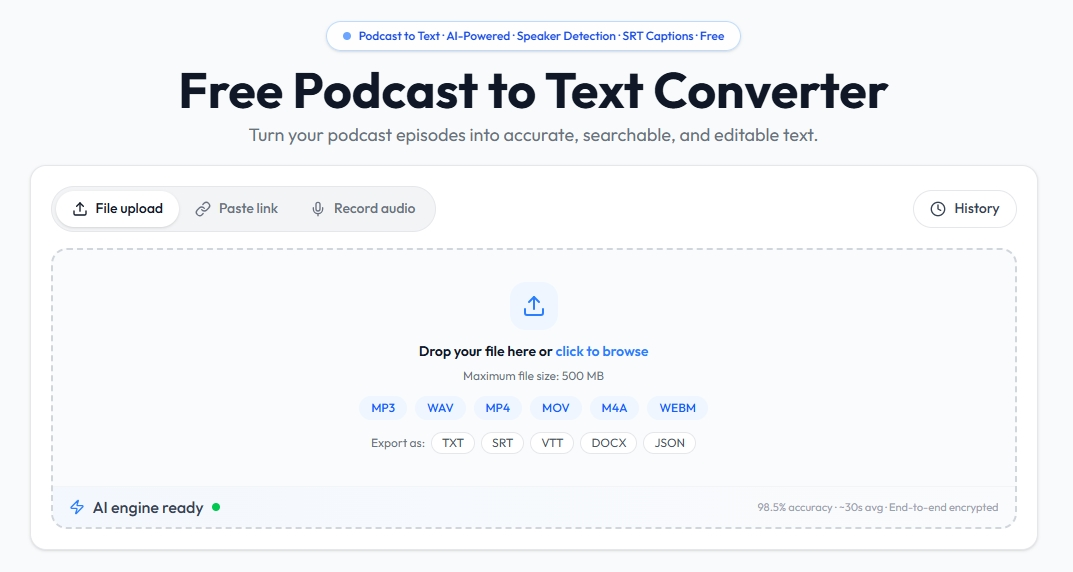
Prepare your podcast audio or video files for conversion with our Podcast to Text Converter. You can directly export MP3 or WAV audio files from common podcast editing and recording platforms including Audacity, Riverside, and Zencastr. If you have a podcast episode uploaded on YouTube, simply download its audio or video file for processing.
STEP 2: Upload Files & Run AI-Powered Transcription
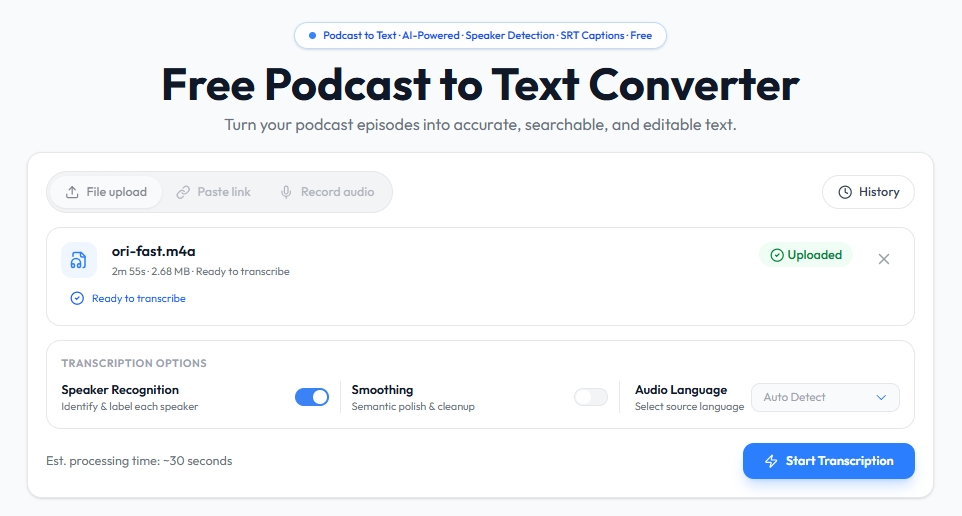
Launch our free Podcast to Text Converter and complete a quick file upload by dragging and dropping your prepared podcast files into the tool. Powered by advanced AI transcription technology, the Podcast to Text Converter automatically converts podcast speech to accurate text, intelligently identifies and separates different speakers, and adds precise timestamps to every single line of the transcript. It delivers ultra-fast processing speed — a standard 30-minute podcast episode can be fully transcribed in just a few minutes.
STEP 3: Review AI Transcripts, Generate Summaries & Export Files
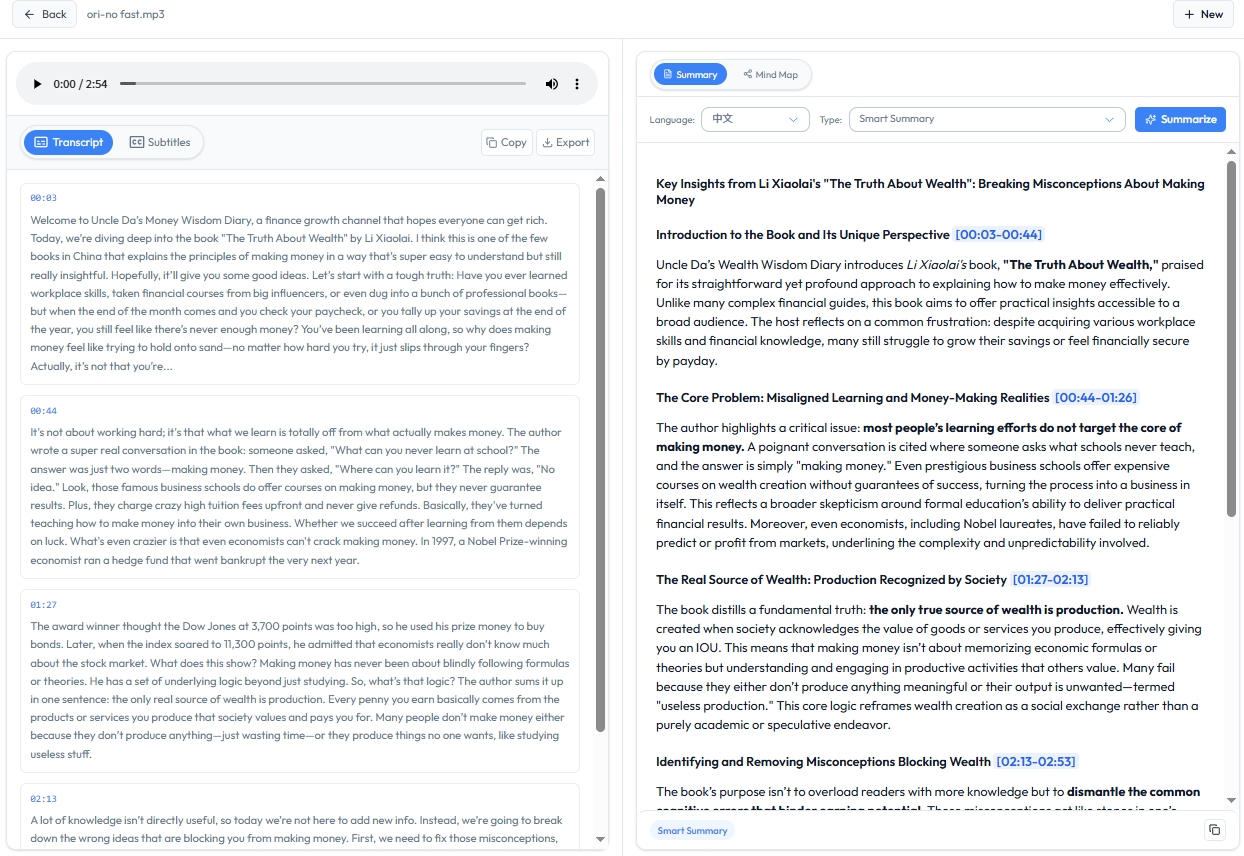 Easily proofread and polish your full podcast transcript with the built-in editor of our Podcast to Text Converter. Activate the smart AI summary feature to automatically generate key episode highlights, clear chapter breaks, and valuable pull quotes from your podcast content. After review, you can export the finalized transcript in multiple flexible formats including TXT, DOCX, PDF, and SRT. The exported files are perfect for creating professional podcast show notes, blog post content, video captions, and various other content creations.
The Pipeline: From Podcast Audio to a Full Content Asset
Each stage can work with any transcription tool — including AudioTranscription.io — without breaking the chain.
Input Layer: Recording and File Management
Keep the original uncompressed audio/video. If you have separate tracks per speaker, retain them — they make later proofing dramatically faster.
Transcription Layer: Automatic + Human Proofing
Let the tool produce the draft. Your proofing targets: names, brand names, technical terms, and sentences that are easy to mishear.
Maintain a Master Transcript
Save one clean "source transcript." Everything else — show notes, captions, edit scripts — branches from it. Never re-transcribe; always derive.
Split and Derive
From the master transcript, extract:
- Main themes and chapters
- Highlight quotes (the "golden lines")
- Mentioned resources and links
Then generate per-channel: blog posts, show notes, emails, social copy, short-video scripts.
Publish and Iterate
Ship across podcast platforms, your site, and social. Watch which formats perform, and feed that back into future episode structure and your transcription routine. This is also where a tool's content hub, summarization, and quote extraction features earn their keep — they collapse steps 8.4 and 8.5 into one screen.
Frequently Asked Questions
Q: Do I really need a full transcript for every episode? When is a summary enough?
A: Not always. Solo or tightly-scripted episodes can get by with a strong summary + timestamps. Interview and panel episodes almost always benefit from a full transcript because the value is in the specific things said.
Q: Should my podcast transcript include timestamps and speaker labels? Which scenarios need them?
A: Speaker labels are near-mandatory for anything with two or more voices. Timestamps help when readers want to jump to a moment or when you're re-editing — worth it for most shows.
Q: I use a podcast host (or Zoom/Teams) — doesn't it already transcribe for me?
A: Often yes, at a basic level. The limitation is usually editing, export format, and how clean the output is. A dedicated tool often produces something you can actually republish without heavy rework.
Q: What if the free tool's accuracy isn't good enough?
A: Proof the high-risk parts (names, terms, numbers) manually, and pick a tool strong on your episode's language. For accented audio, test two tools on the same clip before committing.
Q: How do I choose the right export format — TXT, DOCX, SRT, VTT?
A: TXT/DOCX for articles and notes; SRT/VTT for captions and video platforms. Keep the master as plain text and export specialized formats on demand.
Q: What's the fastest realistic way to convert a podcast to text?
A: Upload a clean audio/video file to an AI transcription tool, let it draft in minutes, proof only the risky bits, and export. End to end, a 45-minute episode can go from recording to usable text in well under 10 minutes of your active time.
Closing: Picking Your Stack and Your Next Move
Free transcription tools get most creators from "no text" to "a usable transcript." The real difference isn't the tool — it's the workflow around it.
Where to start, based on where you are:
- Just starting out — use a free podcast to text converter to stand up a basic transcription flow.
- Already publishing steadily — level up to a content pipeline: summarization, translation, and derivative content from the same source.
Next step: pick one or two representative episodes, run them through the workflow above — including AudioTranscription.io — and see how fast you go from recording to shipped content. The first transcript is the hardest; after that, it's muscle memory.
Want the speed-optimized tool specifically? See our podcast to text page, or explore how to transcribe audio to text and pull a YouTube transcript the same fast way.